
How to Set Up an Always-On Pedal in a Loop Switcher
Posted by Jon Cusack on 1st Oct 2026
|
The 30-second version
|
Setting up an always-on pedal in a loop switcher comes down to one decision: does it go inside a loop or outside the switcher? Both work, and the right answer depends on whether you ever want to turn that pedal off.
We build the Never-Off Series of always-on pedals and the PBT switching systems in Holland, Michigan, so this is the question we get asked most. Here's how we'd wire it.
What counts as an always-on pedal?
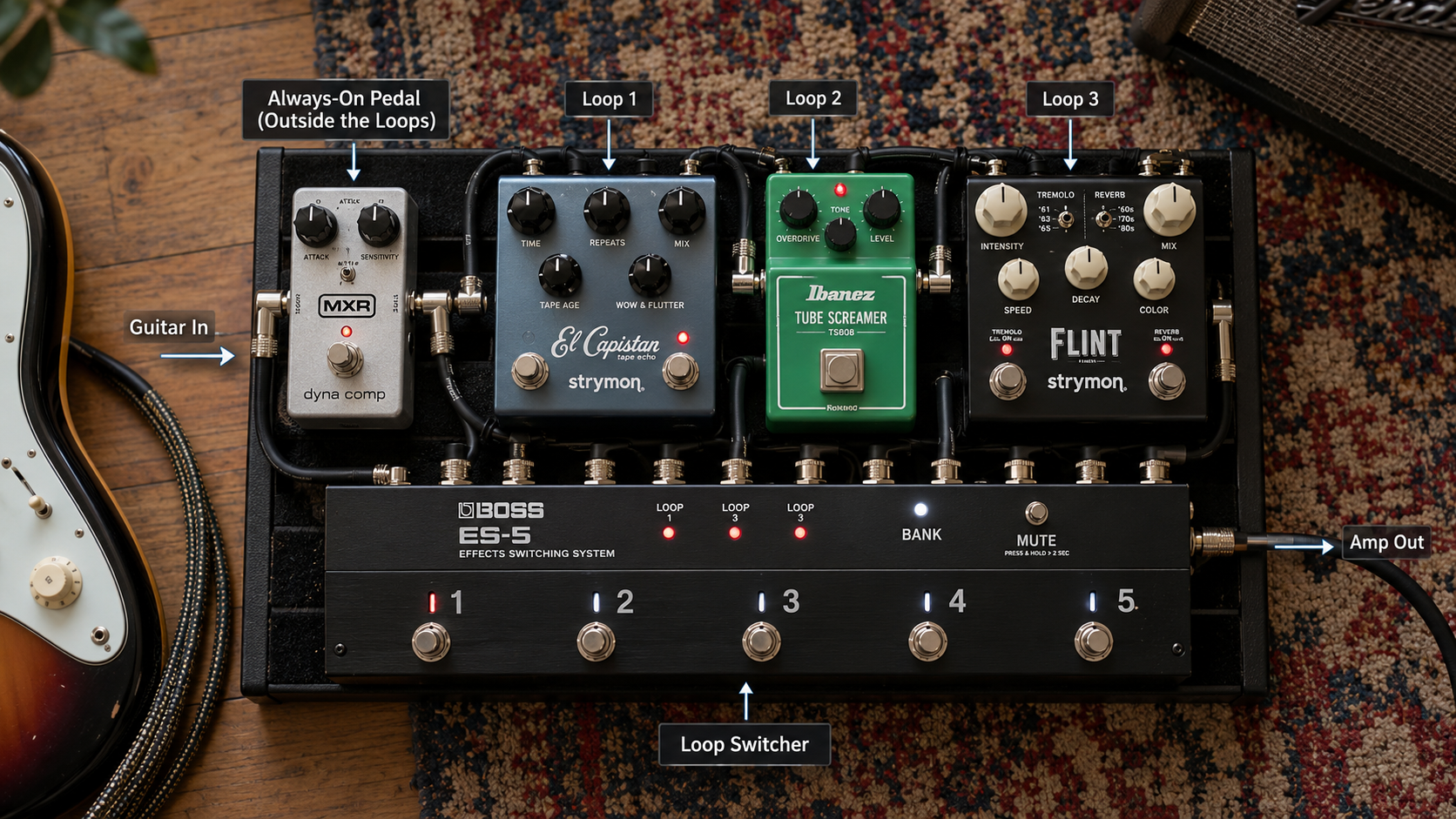
An always-on pedal is any effect you never switch off during a set: a buffer, a clean boost that sets your base level, a compressor, a preamp, or a light overdrive that defines your core tone. If it's on at soundcheck and still on at the encore, it qualifies.
Think of it as the foundation rather than a piece of furniture. You rearrange furniture; you build everything else on the foundation.
Some pedals are built for the job with no bypass switch at all. Ours carry the Never-Off name, and the category exists because a bypass footswitch you will never press is wasted space on a crowded board.
Should the pedal go inside a loop or outside the switcher?
Put it outside the loops if you are certain it stays on, and inside a loop if you want the option to pull it later. That's the whole decision, and it costs you two patch cables either way.
|
Where it goes |
What it means |
Best for |
|---|---|---|
|
In front of the switcher input |
First in the signal chain, always active, no loop used |
Buffers, tuners, wah, pitch effects, compressors |
|
Between the switcher output and the amp |
Last in the chain, always active |
Boosts that set final level, EQ, volume |
|
Inside a loop left engaged in every preset |
Uses one loop, switchable later |
Core drive or preamp you might want off |
|
Inside the amp's effects loop |
Outside the switcher entirely |
Time-based effects on dirty amp channels |
One caveat before you commit. A switcher can only true-bypass what it controls, so a pedal outside the loops is always in your signal path, good tone or bad. Put a noisy pedal out there and you own that noise all night.
How do you set it up, step by step?
Wire the pedal first, then teach every preset about it, then test the rig with the loop both ways. Seven steps, and the order matters.
- Decide the position. Use the table above. Anything that wants to see your pickups directly, like a compressor or a wah, goes in front of the switcher input.
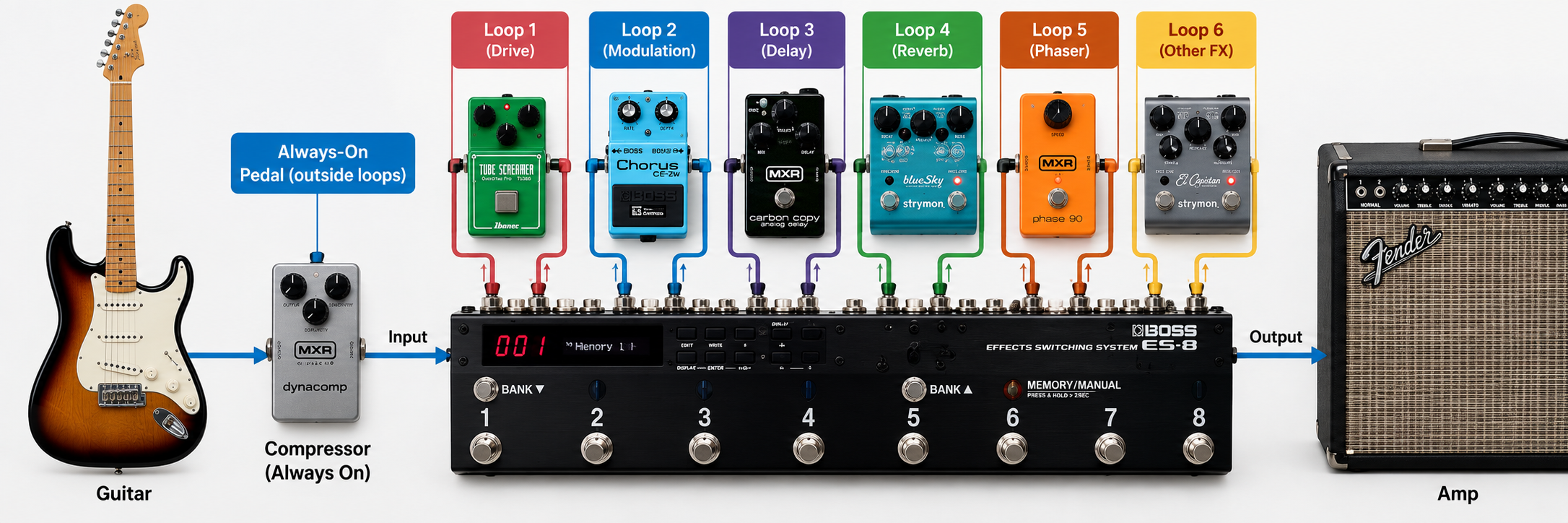
- Patch it in. For a pedal in front, run guitar into the pedal, pedal out into the switcher input. For an in-loop pedal, switcher Loop Send to pedal in, pedal out to Loop Return.
- Set the loop state in every preset. If the pedal lives in a loop, engage that loop and save it to all presets, not just the one you built first. A preset that forgets it is the most common reason a rig sounds thin for one song.
- Never engage an empty loop. Switcher manuals warn about this for good reason: on a series switcher, turning on a loop with nothing patched into it breaks the audio path and your signal stops.
- Set the switcher's buffer. Our PBT switching systems let you pick buffered or true bypass on the input and both outputs, and the PBT-6 runs its last three loops in stereo if your rig needs it.
- Check your power. Never-Off pedals and most compact drives draw little current (our Scream pulls about 9mA), but a daisy chain feeding digital and analog pedals together is a reliable source of hum.
- Test it both ways. Play through every preset, then deliberately bypass the always-on loop and listen. You want to know what that sounds like before a stage tells you.
Where should the buffer sit in a switcher rig?
Put a buffer early, before the longest cable run on the board, which in a switcher rig is usually the trip from the switcher out to your amp. A buffer takes your high-impedance pickup signal and hands the cable a low-impedance copy, the way a pump keeps pressure up over a long hose.
The loading is cumulative, which is the part players miss. Craig Anderton calculates for Sweetwater that three bypassed pedals at 200,000 ohms each present a combined load near 66,000 ohms.
That costs you, in his words, "a significant amount of dulling and some volume loss."
Cable adds its own toll. Sweetwater's note on low-capacitance cables explains that capacitance accumulates with length, and that a 40 foot guitar run is usually where muddiness becomes obvious.
A true bypass switcher helps, since unused loops drop out of the path entirely. It also adds cable, as Premier Guitar's Barry O'Neal has pointed out: every pedal now needs two cables instead of one.
A rough threshold worth knowing: Andertons suggests reaching for a buffer once you run five or more true bypass pedals.
One exception, and it's a real one. Keep buffers away from the input of a vintage-style fuzz, which wants to see your pickups.
If your switcher's own buffer is already on, you may not need another. A dedicated unit such as our Double Buffer gives you a 1M ohm input, a 100 ohm output, and level control on two channels.
What goes wrong, and how do you fix it?
Most switcher faults are patching faults, and they show the same four symptoms. Work through this before you blame a pedal.
|
Symptom |
Likely cause |
Fix |
|---|---|---|
|
No sound when one loop is engaged |
Empty loop, or a dead patch cable in it |
Patch the loop or leave it off; swap the cable |
|
One preset sounds thin |
The always-on loop was not saved into that preset |
Re-save every preset with that loop engaged |
|
Volume drop with several loops on |
Long cable runs and cumulative loading |
Turn on the switcher's input buffer, or add one |
|
Hum that changes with the lights |
Daisy-chained power, or a ground loop |
Use isolated outputs for digital pedals |
|
Tuner reads the effected signal |
Tuner fed from late in the chain |
Use the switcher's tuner out, or put it first |
Here's our honest opinion, and the bias is obvious: most players overthink this. Pick outside-the-loops for anything that truly never comes off, keep one loop free for the pedal you are not sure about, and spend the saved afternoon playing.
Frequently asked questions
Can you leave a loop engaged in every preset?
Yes, and that's the standard way to run an always-on pedal inside a switcher. Program the loop as active in each preset and save them one by one. The only risk is forgetting a preset, so build one preset, copy it, and edit from there rather than starting each from scratch.
Do always-on pedals need a bypass switch?
No, and leaving it off saves board space.
A pedal like our Scream overdrive has no footswitch and no battery compartment, so it fits a 3.67 inch by 1.75 inch enclosure.
The switcher does the switching, so a second switch on the pedal takes up room and earns nothing.
Should a tuner go inside a loop?
Use the dedicated tuner output if your switcher has one, since it taps clean signal and usually mutes the main output. Failing that, put the tuner in the first loop so it sees your guitar rather than your delay trails. Our PBT units add an always-on option to the tuner out, which is handy for silent tuning between songs.
Where does a volume pedal go in a switcher rig?
Outside the loops, and the position changes the behavior. Sweetwater's guidance is that a volume pedal early in the chain acts like your guitar's volume knob and lets delay trails ring out.
One at the end cuts everything, trails included. Match the pot rating to your pickups, 250k for passive.
Do you still need a buffer if the switcher has one?
Usually not at the input, though a second buffer at the end earns its place on a big board. A Double Buffer or similar conditions the long run from the switcher to an amp across the stage, which the input buffer cannot reach. Listen with the run plugged in and out, then trust the comparison.
Can you use a loop switcher with MIDI pedals?
Yes, and the two systems complement each other. As The Rig Doctor's MIDI guide puts it, a non-MIDI pedal can sit in an audio loop that a MIDI controller switches.
One footswitch then changes presets on your MIDI pedals and flips loops at the same time. Save settings on the pedal and on the controller.
The bottom line on always-on pedals in a switcher
|
If the pedal is |
Put it |
Because |
|---|---|---|
|
A buffer or tuner |
In front of the switcher input |
It needs to see the guitar first |
|
A compressor or wah |
In front of the switcher input |
Both react to pickup-level signal |
|
A core drive you may drop |
In a loop, engaged in every preset |
You keep the option without re-patching |
|
A final boost or EQ |
After the switcher output |
It sets level for everything |
|
A pedal with no bypass switch |
Either, by the same rules |
The switcher does the switching |
An always-on pedal does not need a loop to be useful; it needs a position you chose on purpose. Decide whether it ever comes off, wire it accordingly, then save every preset before the first rehearsal.
If you're building a board around this, our pedal switchers and utilities include the PBT-6 switching system, and the Never-Off pedals were designed to live inside it.