
What Is a Tap-Tempo Tremolo? A Complete Guide | Cusack Music
Posted by Jon Cusack on 24th Sep 2026
The 30-second version
- A tap-tempo tremolo is a tremolo pedal that sets the speed of its pulse from footswitch taps, so the volume throb locks to the song instead of a guessed knob position.
- Tremolo changes volume, not pitch. A low-frequency oscillator (LFO) inside the pedal turns your signal down and up, and the Rate, Depth, and Waveform controls shape how.
- The pedal times the gap between your taps and turns it into a rate. Our Tap-A-Whirl needs two taps; averaging designs use three or four.
- Tap divide turns quarter-note taps into eighths, triplets, or dotted eighths. At 120 BPM, a quarter note lasts 500 ms and a dotted eighth lasts 375 ms.
- Tap tempo matters more on tremolo than on most effects, because the pulse lands on every note. Bands playing to a click can use MIDI clock instead, which sends 24 pulses per quarter note.
A tap-tempo tremolo is a tremolo pedal you set by tapping the beat with your foot, so its volume pulse lands in time with the band. Set a regular tremolo by ear instead, and it sounds right for four bars, until the chorus kicks in and your pulse starts fighting the hi-hat.
We build tremolo pedals in Holland, Michigan, including the Tap-A-Whirl, which we introduced as the first analog tremolo pedal with tap tempo built in. This guide draws on our own manuals and the design choices behind them.
What is a tap-tempo tremolo?
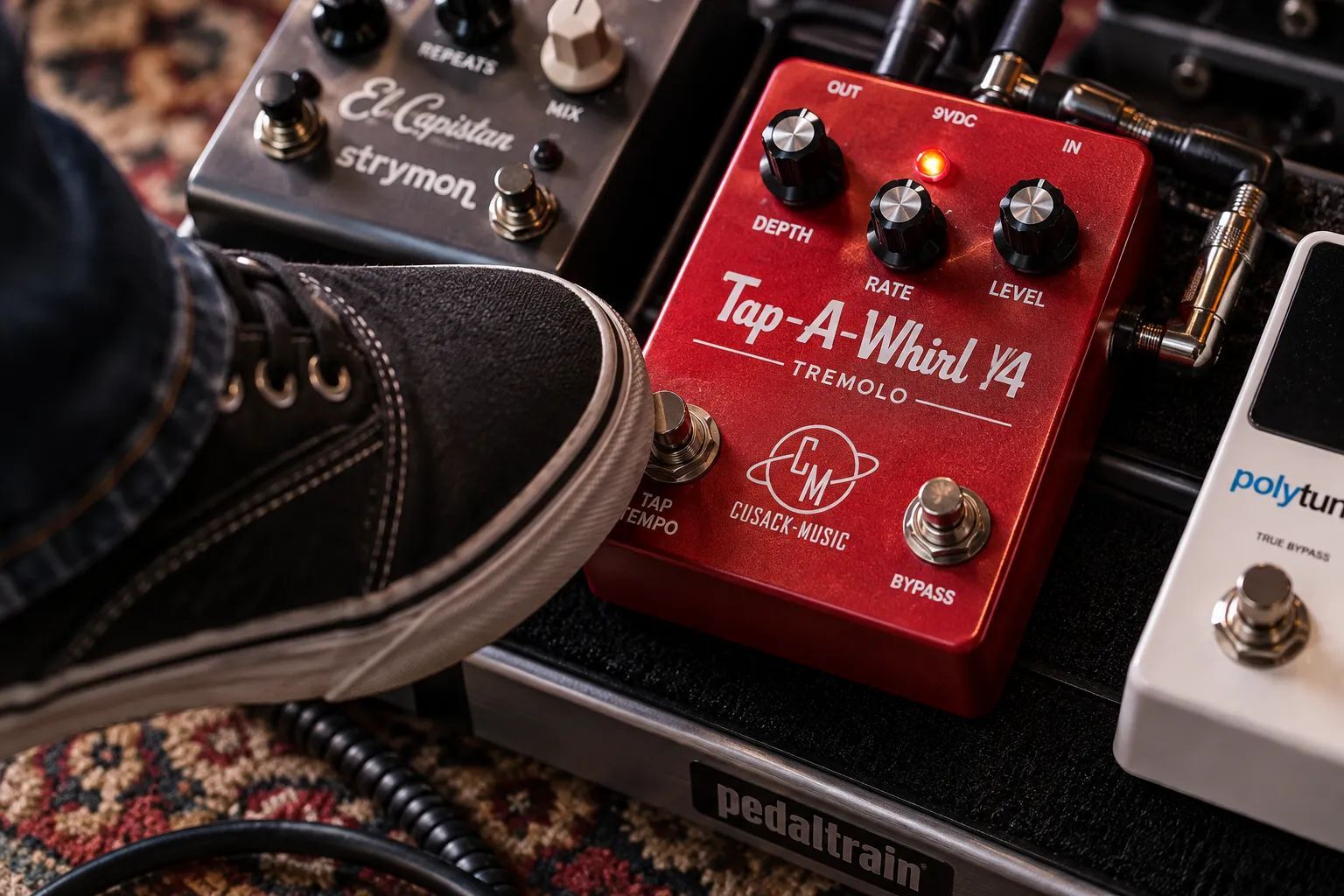
A tap-tempo tremolo is a tremolo effect with a footswitch that sets the speed of the pulse. You tap along with the song, the pedal measures the gap between taps, and it matches its volume swell to that beat. The result stays locked to the music rather than drifting against it.
Think of a drummer's count-in. "One, two, three, four" tells the band the tempo before anyone plays. Your taps do the same job for the pedal: they show it the pulse, and it plays along.
Under the hood, three parts work together. The tap footswitch feeds a small microcontroller, the microcontroller sets the speed of the LFO, and the LFO drives the circuit that turns your volume down and up. Without tap, you're left with a Rate knob, and a knob position has no idea what tempo your drummer is playing tonight.
How does a tremolo pedal work?
A tremolo pedal works by rhythmically lowering and raising the volume of your guitar signal. Picture a hand on your amp's volume knob, rolling it down and back up on a steady schedule. The pedal does exactly that, only faster and without missing a beat.
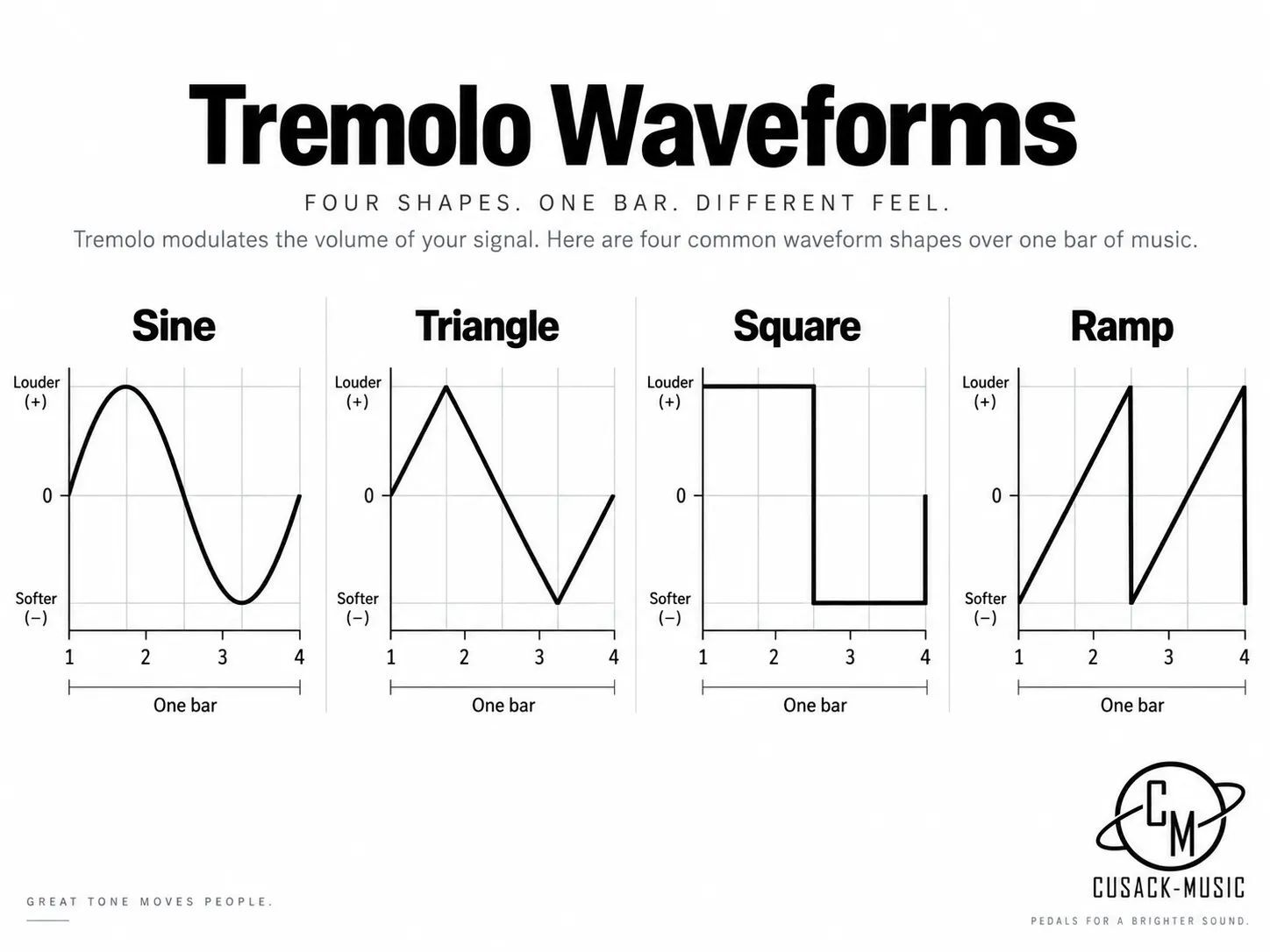
The schedule comes from the low-frequency oscillator, an electronic wave too slow to hear as a note. Three controls shape it:
- Rate (or Speed): how fast the volume rises and falls.
- Depth (or Intensity): how far the volume drops on each dip, from a gentle shimmer to full silence.
- Waveform: the shape of each rise and fall, which sets the feel.
|
Waveform |
How it sounds |
Typical use |
|---|---|---|
|
Sine |
Smooth, rounded throb |
Vintage amp tremolo, slow ballads |
|
Triangle |
Even, linear rise and fall |
A more defined pulse that still flows |
|
Square |
Hard on and off chop |
Stutter effects, rhythmic rock parts |
|
Ramp or saw |
Swells one way, then resets |
Reverse-style pulses |
|
Rhythmic patterns |
Multi-step accents |
Syncopated and odd-meter parts |
Tremolo is one of the oldest guitar effects. Guitar.com's history of tremolo traces it from DeArmond's 1940s Tremolo Control to Fender's 1955 Tremolux and the light-driven photocell circuits in Blackface Fender amps.
That photocell idea lives on in the vactrol, a tiny light source and light sensor sealed in one package. The original Tap-A-Whirl was built around a vactrol, and when that part went obsolete we had a custom replacement made for the V4 that reaches faster tempos.
What amps never offered was a way to lock the pulse to a song, and that's the gap tap-tempo pedals filled.
Guitar.com makes the point with Johnny Marr's part on "How Soon Is Now?": matching trem speed to a song's tempo like that is hard to do on an amp.
How is tremolo different from vibrato and harmonic tremolo?
Tremolo changes volume; vibrato changes pitch. That's the whole distinction, and guitar makers have muddied it for more than 70 years.
As Fender explains in its own history of the terms, the 1954 Stratocaster's pitch-bending bridge was sold under the ad headline "Tremolo Action," while many amps labeled their tremolo circuits "vibrato."
|
Effect |
What changes |
Sounds like |
Where you find it |
|---|---|---|---|
|
Tremolo |
Volume |
Pulsing, from watery to choppy |
Tremolo pedals, many amps |
|
Vibrato |
Pitch |
Wavering, slightly seasick |
Vibrato pedals, your fretting hand, the "trem arm" |
|
Harmonic tremolo |
Volume of highs and lows, out of phase |
Swirling, close to a phaser |
Brownface-era Fender amps, some pedals |
Harmonic tremolo works like two people taking turns on your treble and bass knobs: as the highs dip, the lows swell. In the tremolo vs vibrato debate, tap tempo stays neutral. It only sets the speed, whatever the pedal is modulating.
How does tap tempo work on a tremolo pedal?
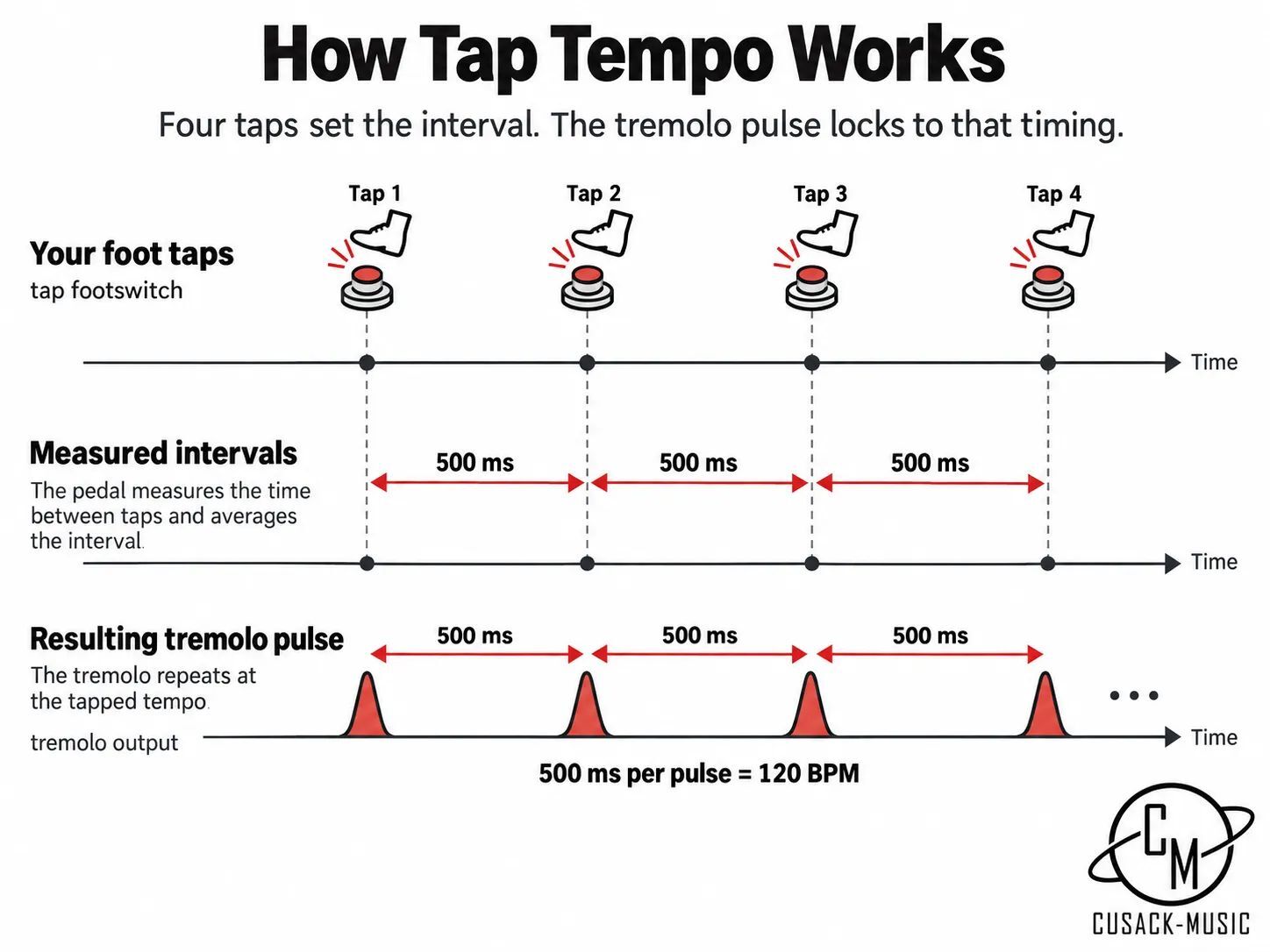
Tap tempo works by timing the gap between your footswitch presses and turning that gap into a speed. Tap once per beat and the pedal knows how long a beat lasts. Here's what happens inside:
- You press the tap footswitch in time with the music, usually on quarter notes.
- The microcontroller timestamps each press and measures the interval between them.
- It converts that interval to a tempo. At 120 BPM, taps land 500 milliseconds apart.
- The LFO resets to that rate, which takes over from the Rate knob's setting.
Pedals differ in how many taps they want. Our Tap-A-Whirl sets its tempo from two taps.
Averaging designs want more: a tap tempo example from UC Irvine's music department averages the three most recent intervals from the last four taps.
Averaging is like timing a runner over several laps rather than trusting the one lap where they stumbled. More taps smooth out a sloppy foot. Fewer taps respond faster when the tempo changes.
Timing taps is a digital job, so every tap-tempo pedal has a microcontroller inside. The audio path doesn't have to be digital, though. The Tap-A-Whirl V4 keeps its signal path fully analog and uses digital control only for timing and presets.
What do tap divide and subdivisions do?
Tap divide lets one tapped beat drive faster or slower pulses. You tap quarter notes, and the pedal converts them into eighth notes, triplets, or dotted eighths. Think of it as a gearbox: your foot sets the engine speed, and the divide picks the gear.
The math is simple. One quarter note lasts 60,000 divided by the BPM, in milliseconds. Every subdivision is a fraction of that.
|
Subdivision |
Pulses per beat |
Time between pulses at 120 BPM |
Feel |
|---|---|---|---|
|
Quarter note |
1 |
500 ms |
Slow, stately throb |
|
Dotted eighth |
1.33 |
375 ms |
Rolling push that realigns every three beats |
|
Eighth note |
2 |
250 ms |
Driving, even chop |
|
Eighth-note triplet |
3 |
167 ms |
Galloping shuffle |
|
Sixteenth note |
4 |
125 ms |
Fast flutter |
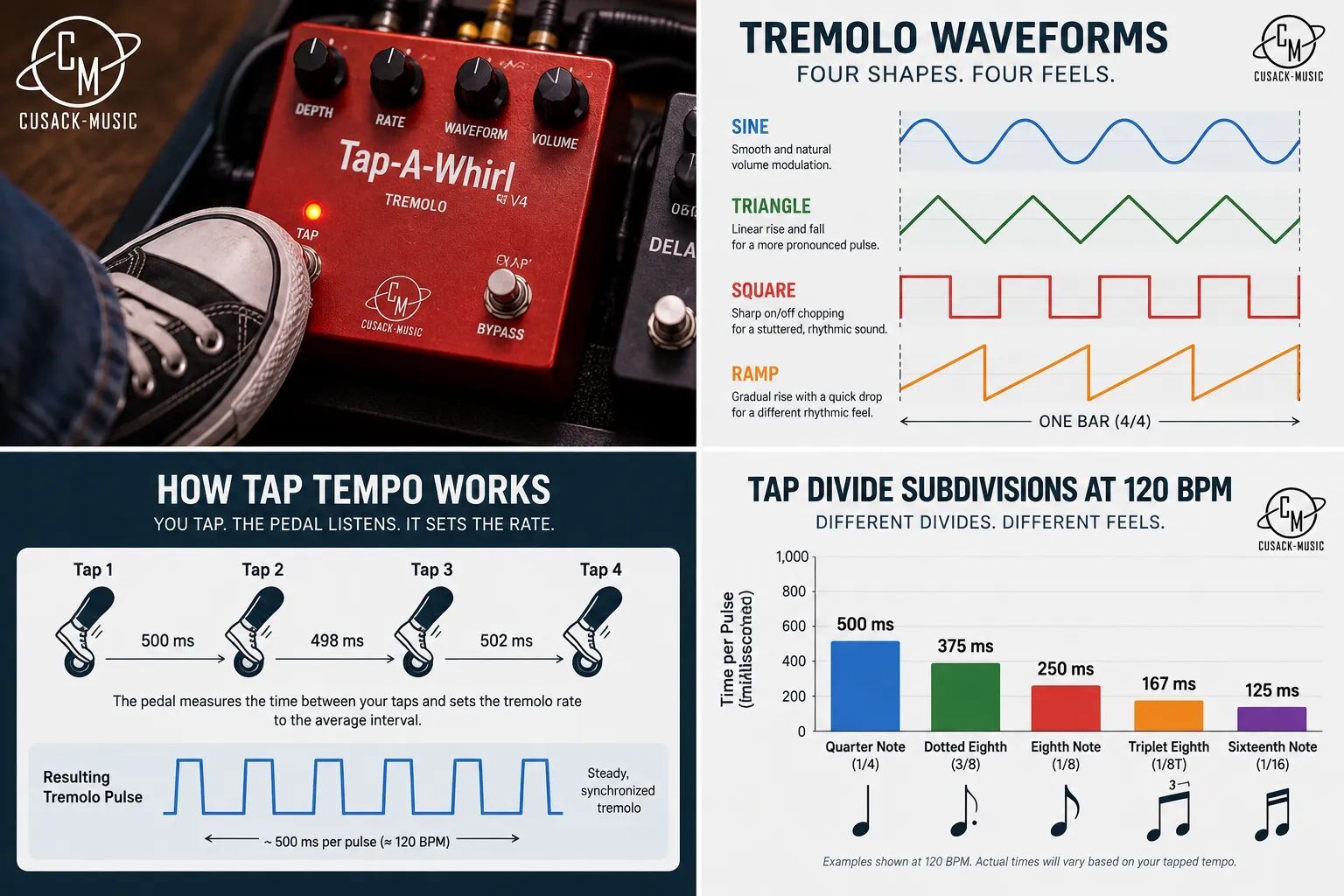
Our Tremolo AME offers three tap divide settings, starting with quarter and eighth notes. The Tap-A-Whirl V3 manual lists eight divide positions (1/4, 1/3, 1/2, 1, 2, 3, 4, and 6) that scale the tapped tempo slower or faster.
No dotted setting on your pedal? Tap dotted quarter notes with the divide on eighths. Each tap then spans 750 ms at 120 BPM, and splitting it in two gives the 375 ms dotted eighth pulse.
Is tap tempo worth it on a tremolo?
Yes, and we'd go further: tap tempo matters more on a tremolo than on a delay. A delay's repeats sit behind your notes, but a tremolo's pulse is on every note you play. A few BPM off, and the whole part sounds like it's arguing with the drummer.
Not everyone is sold on tap tempo: Premier Guitar's Alex Guaraldi questions whether it's worth it for delay, since tapping 121 BPM against a 120 BPM drummer drifts every bar.
Even he makes an exception for amplitude tremolo. His drift point is fair, though, and it's the real limit of tap tempo: it's only as accurate as your foot.
If your band plays to a click, MIDI clock is tighter. The MIDI 1.0 specification sends a Timing Clock message 24 times per quarter note.
So where does that leave you?
- Prioritize tap tempo if you play live with a drummer, use square waves or rhythmic patterns, or change tempos all night.
- A Rate knob is enough if your tremolo is slow and shallow, you use it once a set, or you record to a fixed tempo and dial it in by ear.
- Look for MIDI clock or sync if your band runs a click track or backing tracks.
Want to hear it? The demo videos on our analog tap-tempo tremolo page show the pulse locking in as the tempo is tapped.
What should you look for in a tap-tempo tremolo pedal?
Look for a dedicated tap footswitch, tap divide options, and a way to sync other gear. After that, it comes down to how many sounds you want and how much board space you have.
|
Feature |
What it does |
Who needs it |
|---|---|---|
|
Dedicated tap footswitch |
A separate switch just for tapping |
Anyone tapping mid-song; shared switches often need a long press first |
|
Tap divide with a dotted option |
Turns quarter-note taps into subdivisions |
Players who want syncopated patterns |
|
Waveform choice |
Sine through square to multi-step patterns |
Anyone after more than one trem sound |
|
Level knob |
Makes up the perceived volume drop |
Most players |
|
Tap in or tap out jack |
Takes a remote switch, or sends tempo onward |
Players syncing tremolo and delay |
|
Expression input |
Sweeps rate or depth with your foot |
Hands-free speed changes |
|
Brake or ramp |
Speeds up or slows down while held |
Rotary-style endings and swells |
|
Presets and stereo |
Store settings; spread the pulse across two amps |
Players with bigger rigs |
Our two tap-tempo tremolos split along those lines. The Tap-A-Whirl V4 is the full kit: 24 waveforms, a stereo signal path, presets, and directional brake footswitches.
The Tremolo AME fits tap tempo, nine waveforms, and brake into a much smaller box.
If the pedal sits at the back of your board, an external tap switch like our Tap to RCA puts the tap under your foot.
How do you use a tap-tempo tremolo in a real song?
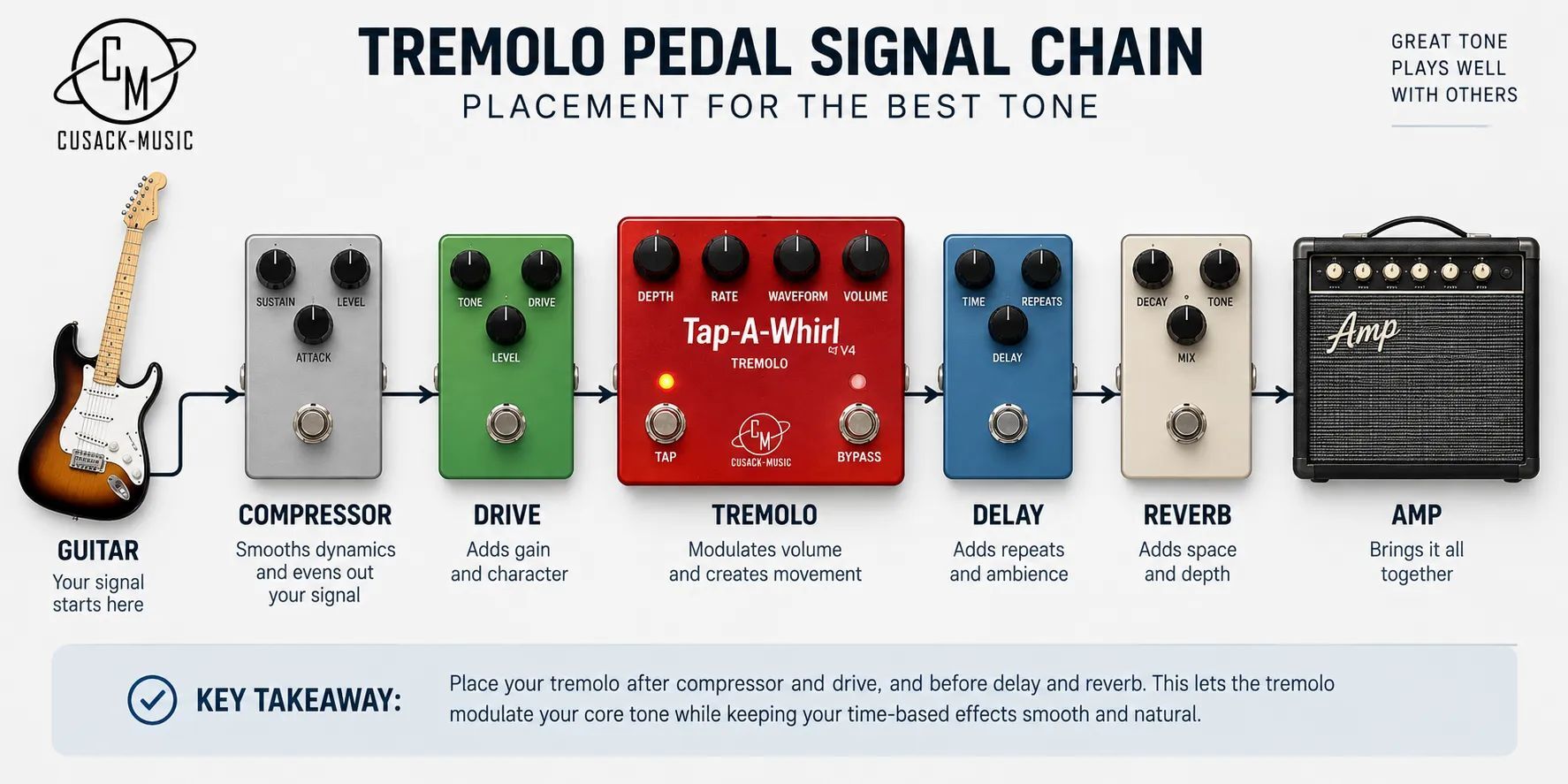
Set it late in your chain, pick the feel, then tap the beat you hear from the drums, not the one in your head.
- Place it late in the chain. Run tremolo after overdrive and fuzz and before delay and reverb. Keep any compressor ahead of it, since a compressor after a tremolo flattens the dips.
- Set depth and waveform first. Start near half depth on a sine wave, then move toward square for more chop.
- Choose the divide. Quarter notes for a slow throb, eighths for drive, dotted eighths for syncopation.
- Tap a full bar. Tap along with the kick and snare. Four steady taps beat two rushed ones.
- Retap between sections. If the pulse drifts away from the snare, tap again. It takes a second.
- Sync your delay. With a tap out, send the tremolo's tempo to a delay's tap input so both share one clock. Pairing one? Start with our delay and reverb pedals.
- End with the brake. Hold the tap switch to ramp the speed at the end of a song. On the Tremolo AME you choose whether the new speed stays, snaps back, or drifts back.
Two tips from our Tap-A-Whirl manual. Push Depth past about noon on the sine wave and the waveform clips into the lopsided pulse of an old amp tremolo.
On the rhythmic patterns in Bank C, Depth doubles as an accent control. Full depth plays only the main beats; lower depth lets the off beats through at a lower level.
Frequently asked questions
Do you have to tap on quarter notes?
Most pedals assume your taps are quarter notes and build every subdivision from them. You can tap other values, but the divide settings will then be off by the same ratio. The simplest habit is to tap with the kick and snare on each beat, then let tap divide create the faster rhythms.
Can one tap switch control more than one pedal?
Yes, if one pedal can pass its tempo along. On our earlier Tap-A-Whirl V3, the RCA jack works as a tap in or a tap out, so you can tap the tremolo and send its tempo to another pedal's tap input. Without a tap out, you need a controller that can trigger several pedals at once.
Does the Rate knob still work after you tap?
It depends on the pedal: on our Tremolo AME, a tapped tempo overrides wherever the Rate knob sits. Some designs hand control back when you turn the knob, and others wait for a new tap. Check before a gig; our manuals live on the pedal manuals page.
What does the flashing light on a tremolo pedal mean?
It shows the tremolo's current rate, so you can check a tapped tempo against the drummer before you commit. On our Tremolo AME, the clear Rate knob flashes in time and its brightness follows the Depth setting, so one glance tells you both how fast and how deep the pulse is.
Why does a tremolo pedal sound quieter when it's on?
Because tremolo removes volume on every dip, your ear hears a lower average level even when the peaks match your dry tone. That's why most tremolo pedals include a Level knob. Set Depth first, then raise Level until the pedal sounds equally loud on and off.
Is there a tap-tempo tremolo plugin?
Most DAW tremolo plugins can sync to your session tempo, which does the same job as tapping. If you want the Tap-A-Whirl character in your recordings, we offer a free Tap-A-Whirl plugin to our email subscribers.
The bottom line on tap-tempo tremolo
|
Term |
What it means |
|---|---|
|
Rate |
Speed of the pulse, set by a knob |
|
Depth |
How far the volume drops on each dip |
|
Tap tempo |
Sets the rate from footswitch taps |
|
Tap divide |
Turns tapped beats into subdivisions |
|
Tap out or sync |
Sends your tempo to another pedal |
|
Brake |
Ramps the speed while the switch is held |
|
MIDI clock |
24 pulses per quarter note from a sequencer or controller |
A tap-tempo tremolo is a regular tremolo with one upgrade that changes how it behaves in a band: it follows your foot instead of a guess. Start with quarter-note taps, a sine wave, and half depth, then explore divides and patterns.
When you're ready, browse our modulation pedals to compare our two tap-tempo tremolos side by side.